Technology has transformed the way people teach, present ideas, and communicate with audiences. Traditional wooden lecterns are gradually being replaced by smarter solutions that combine multiple presentation tools into a single workstation. One of the most useful innovations in this area is the Digital Podium.
Whether you are teaching in a classroom, delivering a corporate presentation, or speaking at a conference, a digital podium helps you manage your content more efficiently. It provides quick access to computers, touch displays, microphones, document cameras, and other multimedia devices without requiring multiple pieces of equipment. Educational institutions, government organizations, training centers, and businesses around the world are adopting digital podiums because they create a more interactive and professional presentation environment. Instead of spending time connecting cables or switching between devices, presenters can focus on delivering their message.
In this guide, you will learn what a digital podium is, how it works, its key features, benefits, and how to choose the right one for your organization.
What is a Digital Podium?
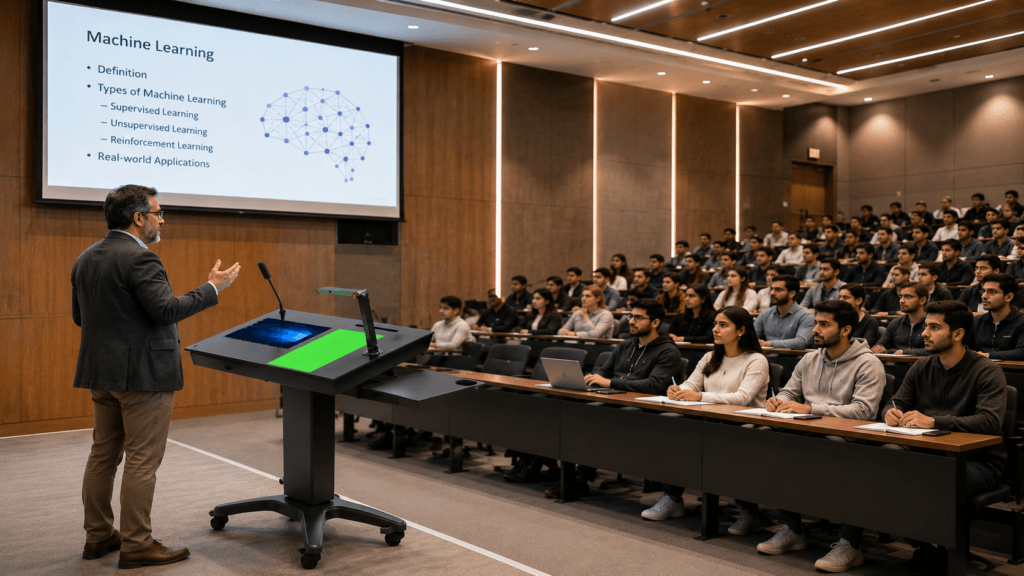
A digital podium is an advanced presentation station that combines a traditional lectern with modern technology. It serves as a central control point where speakers can operate different presentation devices from one convenient location. Unlike a standard podium that only provides a place to keep notes or a laptop, a digital podium integrates multiple technologies into a single unit. These may include a built-in computer, touchscreen monitor, wireless microphone, audio controls, document camera, keyboard, projector controls, USB ports, HDMI connectivity, and network access. The primary goal of a digital podium is to simplify presentations while improving audience engagement. Instead of moving between different devices, presenters can control everything directly from the podium.
Modern digital podiums are commonly installed in:
- Schools and colleges
- Universities
- Training institutes
- Corporate meeting rooms
- Conference halls
- Government offices
- Auditoriums
- Seminar rooms
Because everything is organized in one place, presentations become smoother, more professional, and less stressful.
Main Components of a Digital Podium
Although features vary by manufacturer, most digital podiums include several standard components designed to support teaching and professional presentations.
Interactive Touchscreen Display
A touchscreen monitor allows presenters to control presentations directly with their fingers. Users can open applications, annotate documents, browse the internet, and switch between programs without needing a separate mouse.
Built-in Computer
Many digital podiums include an integrated desktop computer or mini PC capable of running presentation software, video conferencing applications, web browsers, and educational programs.
Microphone System
Built-in or wireless microphones help deliver clear audio throughout classrooms, lecture halls, and conference rooms. Some systems also support multiple microphones for panel discussions.
Audio Controls
Digital podiums often feature integrated audio management, allowing presenters to adjust microphone volume, speaker output, and multimedia sound without additional equipment.
Connectivity Options
Modern podiums usually provide multiple connection ports such as:
- HDMI
- USB-A and USB-C
- VGA (on selected models)
- LAN port
- Wi-Fi connectivity
- Bluetooth support
These options make it easy to connect laptops, projectors, storage devices, interactive displays, and other presentation equipment.
Document Camera Support
Many educational institutions use document cameras to display books, handwritten notes, diagrams, and physical objects on large classroom screens. A digital podium provides simple integration for these devices.
Key Features of a Digital Podium
Today’s digital podiums are designed to make presentations more engaging, organized, and efficient. While features vary between models, the following capabilities are commonly found in high-quality digital podiums.
Centralized Control System
One of the biggest advantages of a digital podium is that it brings multiple devices together in one place. Instead of managing separate controls for the projector, audio system, computer, and display, users can operate everything from a single workstation. This saves time and reduces technical interruptions during presentations.
Interactive Teaching and Presenting
Many digital podiums support touch-enabled displays or interactive screens. Presenters can highlight important points, write notes, draw diagrams, or annotate documents in real time. This makes lessons and presentations more engaging for the audience.
Multiple Device Connectivity
Modern presentations often involve different devices. A digital podium makes it easy to connect laptops, USB drives, projectors, external monitors, webcams, and audio equipment without complicated setups.
Built-in Security
Many models include lockable storage compartments to protect computers, microphones, and other valuable equipment. This is especially useful in schools, universities, and public institutions where multiple people use the same podium.
Cable Management
Messy cables can make any presentation area look unprofessional. Digital podiums are designed with built-in cable management systems that keep wires organized and hidden, creating a clean and modern workspace.
Benefits of Using a Digital Podium
Investing in a digital podium offers practical advantages for both presenters and audiences. It improves communication, simplifies technology management, and creates a more professional presentation experience.
Improves Classroom Learning
Teachers can display presentations, educational videos, websites, digital textbooks, and live demonstrations without switching between different devices. Interactive lessons help students stay focused and participate more actively.
Saves Valuable Time
Instead of spending several minutes connecting cables or adjusting equipment before every session, presenters can start their lessons or meetings almost immediately. This allows more time for productive discussions and learning.
Creates Professional Presentations
A well-organized presentation station gives speakers confidence. Whether presenting to students, clients, or conference attendees, a digital podium helps create a polished and professional impression.
Supports Hybrid Learning and Meetings
Many organizations now conduct online and hybrid sessions. Digital podiums can work with webcams, microphones, conferencing software, and interactive displays, making it easier to communicate with both in-person and remote participants.
Reduces Equipment Clutter
Instead of placing multiple devices on separate tables, everything is integrated into one compact unit. This improves workspace organization and reduces the risk of accidental damage to equipment.
Where Are Digital Podiums Used?
Digital podiums are suitable for a wide range of environments where presentations, teaching, or public speaking are part of daily operations.
Educational Institutions
Schools, colleges, universities, and training centers use digital podiums to deliver interactive lessons, conduct seminars, and support multimedia learning. Teachers can quickly access digital content while maintaining better engagement with students.
Corporate Offices
Businesses use digital podiums during board meetings, employee training sessions, product demonstrations, and client presentations. Integrated technology helps meetings run more smoothly and professionally.
Government Organizations
Government departments often install digital podiums in conference rooms, auditoriums, and public meeting halls to support official presentations, workshops, and public awareness programs.
Conference and Seminar Halls
Professional speakers benefit from having presentation controls, microphones, and multimedia devices available in one location. This reduces technical delays and allows them to focus on delivering valuable information.
Libraries and Research Centers
Research institutions and libraries use digital podiums for workshops, training sessions, academic discussions, and knowledge-sharing events where multimedia presentations are frequently required.
Types of Digital Podiums
Digital podiums are available in different designs to meet the needs of classrooms, conference rooms, and public institutions. Choosing the right type depends on your available space, presentation style, and technology requirements.
Standard Digital Podium
This is the most common option for schools, colleges, and training centers. It typically includes a built-in computer compartment, touchscreen display, microphone support, and multiple connectivity ports.
Interactive Smart Podium
Interactive models feature large touchscreens that allow presenters to write, draw, annotate documents, and control presentations directly from the display. These podiums are ideal for smart classrooms and collaborative learning environments.
Mobile Digital Podium
Equipped with wheels, mobile podiums can be moved between classrooms or meeting rooms with ease. They are an excellent choice for organizations that require flexible presentation setups.
Custom Digital Podium
Some organizations require specialized configurations, such as additional storage, dual displays, integrated audio systems, or advanced control panels. Custom-built digital podiums can be designed to match these specific operational needs.
How to Choose the Right Digital Podium
Investing in a digital podium is a long-term decision. Before purchasing one, consider the following factors to ensure it meets your current and future requirements.
Understand Your Purpose
Identify where the podium will be used. A classroom may require interactive teaching features, while a corporate boardroom may prioritize video conferencing and presentation controls.
Display Quality
Choose a podium with a responsive, high-resolution touchscreen that provides smooth interaction and clear visuals during presentations.
Connectivity Options
Ensure the podium includes modern connectivity such as HDMI, USB, USB-C, Wi-Fi, Bluetooth, and network ports. This improves compatibility with laptops, projectors, interactive panels, and other devices.
Build Quality
A sturdy metal or high-quality wooden construction offers better durability, especially in educational institutions where the podium is used daily.
Future Expansion
Select a model that can accommodate additional equipment such as document cameras, webcams, wireless microphones, or upgraded computer systems as your technology needs grow.
Maintenance Tips
- Clean the touchscreen regularly using a soft microfiber cloth.
- Keep software and operating systems updated.
- Inspect cables and connectors periodically.
- Avoid placing liquids near electronic components.
- Ensure proper ventilation to prevent overheating.
- Schedule routine inspections for microphones and audio systems.
Regular maintenance not only extends the lifespan of the equipment but also ensures reliable performance during important presentations.
Conclusion
A well-designed digital podium improves communication, keeps presentations organized, and creates a more engaging learning experience for both presenters and audiences. At MNK Digital, we provide complete educational and professional technology solutions designed to create smarter learning and presentation environments. Our portfolio includes advanced Interactive Displays, Touch Displays, Hospitality TVs, high-performance Monitors, Digital Signage, and Video Wall solutions, all integrated to support modern classrooms, universities, corporate offices, hotels, and government organizations. Whether you’re building a smart classroom or upgrading a conference facility, our innovative solutions help improve communication, collaboration, and audience engagement.
Frequently Asked Questions
- What is the purpose of a digital podium?
A digital podium combines presentation technology into one workstation, allowing users to control computers, projectors, microphones, and multimedia devices from a single location. - Who should use a digital podium?
Digital podiums are ideal for schools, universities, corporate offices, government organizations, training institutes, conference centers, and auditoriums. - Can a digital podium connect to interactive displays?
Yes. Most modern digital podiums support interactive flat panels, projectors, external monitors, document cameras, and other multimedia equipment through multiple connectivity options. - Are digital podiums suitable for online presentations?
Absolutely. They can be integrated with webcams, microphones, speakers, and video conferencing platforms, making them suitable for virtual and hybrid meetings. - What is the price of Digital Podium?
The price of a HoverCam Digital Podium depends on the model, included accessories, and installation requirements. Contact MNK Digital for the latest pricing and a customized quotation.