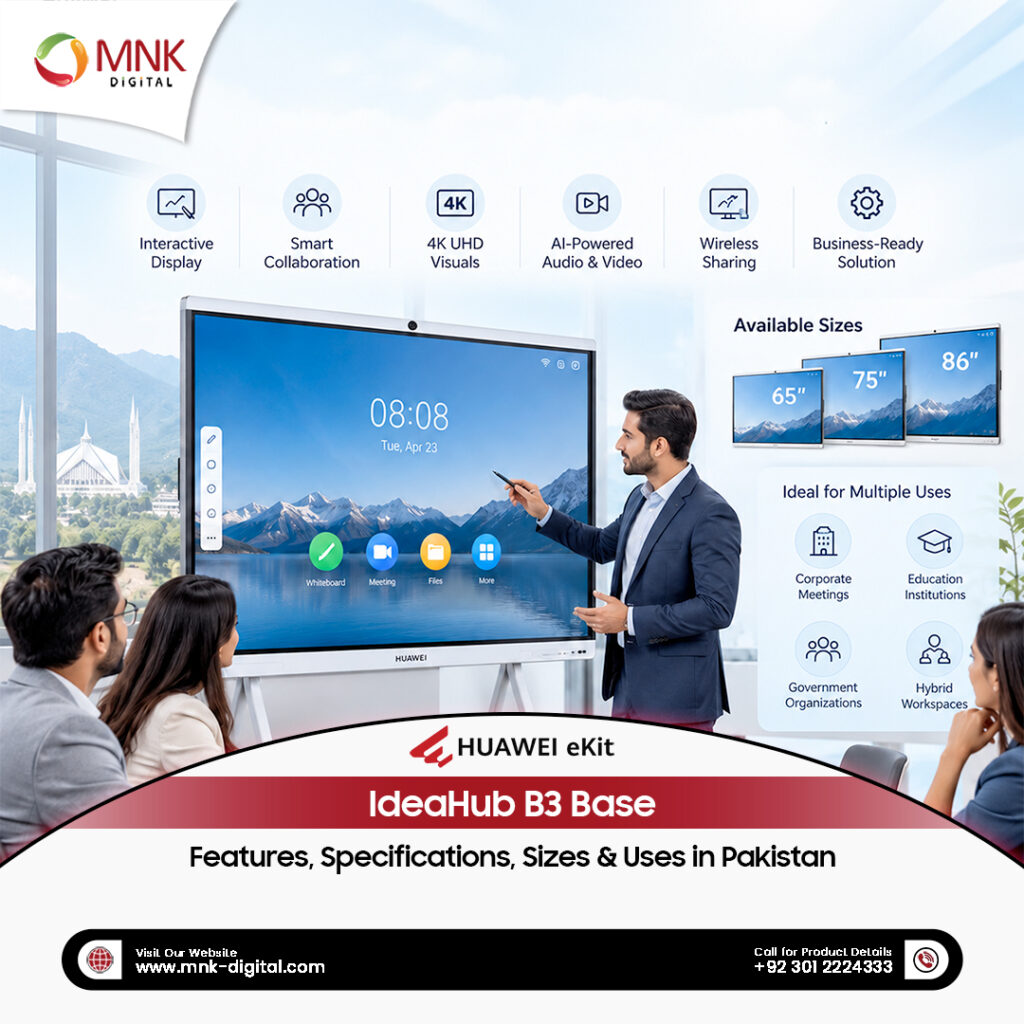
Meetings often become less productive when teams spend too much time connecting laptops, adjusting cameras, sharing presentations, or switching between devices. A well-equipped meeting room should make these tasks easier, allowing people to focus on the discussion rather than the technology. The Huawei IdeaHub B3 Base is designed to bring these essential meeting tools together in one interactive display. It combines a 4K touchscreen, built-in video conferencing hardware, wireless screen sharing, and a digital whiteboard to support everyday business communication. Available in 65-inch, 75-inch, 86-inch, and 98-inch sizes, the IdeaHub B3 Base is suitable for different workplace environments, from executive offices to larger conference and training rooms.
For businesses in Pakistan considering an interactive display, understanding the available sizes, technical specifications, and system configurations can make choosing the right model much easier.
What Is the Huawei IdeaHub B3 Base?
The Huawei IdeaHub B3 Base is an all-in-one interactive meeting display developed for businesses that need a practical solution for presentations, video conferences, and team collaboration. Unlike a conventional television or projector, it allows users to interact directly with the displayed content. Teams can write on the screen, present documents, share laptop displays, and participate in online meetings using the built-in camera, microphones, and speakers. The system supports an Android computing module and offers Windows OPS configurations for businesses that need additional desktop software capabilities. Its main purpose is to reduce the number of separate devices needed in a meeting room while making collaboration more convenient.
Huawei IdeaHub B3 Base Sizes and Available Models
Huawei offers the IdeaHub B3 Base in four screen sizes. Each model has the same 4K UHD resolution, but the physical dimensions and weight vary.
| Screen Size | Model Number | Dimensions (W × H × D) | Net Weight |
|---|---|---|---|
| 65 inch | IHB3-65AC | 1484.5 × 924.7 × 90 mm | 37 kg |
| 75 inch | IHB3-75AC | 1705.7 × 1048.9 × 90 mm | 48.7 kg |
| 86 inch | IHB3-86AC | 1953 × 1188.9 × 90 mm | 60 kg |
| 98 inch | IHB3-98AC | 2216.4 × 1341.7 × 96.4 mm | 94 kg |
These are the overall product dimensions, not just the visible display area.
65-Inch Huawei IdeaHub B3 Base
The 65-inch model is a practical option for executive offices, smaller meeting rooms, and spaces where a large interactive display is needed without occupying too much wall space. It can be used for daily presentations, online discussions, document reviews, and small-group brainstorming sessions.
75-Inch Huawei IdeaHub B3 Base
The 75-inch version provides additional screen space for presentations and shared documents. It is worth considering for regular conference rooms where several people need to view spreadsheets, diagrams, or video meeting participants from different seating positions.
86-Inch Huawei IdeaHub B3 Base
The 86-inch model offers a larger working area for team collaboration. It is particularly useful for spacious meeting rooms, training sessions, and environments where people regularly work together on detailed presentations or visual content.
98-Inch Huawei IdeaHub B3 Base
The 98-inch model is the largest option in the range. Its display area makes it suitable for larger conference rooms, training halls, and business presentation spaces where information needs to remain visible to a broader audience. Before choosing this model, buyers should check wall dimensions, installation access, mounting arrangements, and the viewing distance from the seating area.
4K UHD Display with Anti-Glare Technology
Display quality is important in a meeting room, particularly when participants need to read detailed documents, spreadsheets, or presentations. The Huawei IdeaHub B3 Base features a 4K UHD display with a resolution of 3840 × 2160 pixels. This provides enough detail for common office applications, including presentations, reports, charts, and video content. Its D-LED screen uses zero-gap bonding technology, while the anti-glare surface helps reduce reflections from surrounding lighting. The display also includes hardware-level optical low-blue-light technology, designed to reduce blue-light exposure while maintaining image colour. Key display specifications include:
- 3840 × 2160 UHD resolution
- 350-nit typical brightness
- 60 Hz refresh rate
- 1200:1 contrast ratio
- At least 178-degree viewing angle
- 72% NTSC colour gamut
- Anti-glare glass surface
- Automatic brightness adjustment
For Pakistani offices with windows and overhead lighting, anti-glare treatment can be particularly useful. However, screen placement still matters. Strong direct sunlight or poorly positioned lights may affect viewing comfort.
Interactive Touchscreen and Digital Whiteboard
One of the main differences between the IdeaHub B3 Base and an ordinary display is its interactive touchscreen. The system uses infrared touch technology and supports up to 40 simultaneous touch points. This allows multiple users to interact with the screen during collaborative activities. According to Huawei’s technical documentation, it offers touch precision of ±1 mm and a touch response time of 4 milliseconds or less. The built-in intelligent whiteboard allows users to write with a finger or stylus, draw diagrams, highlight important points, and organise information visually.
Useful Whiteboard Functions
The digital whiteboard includes several tools for everyday collaboration:
- Handwriting and drawing
- Highlighter and pen effects
- Recognition of text and graphics
- Mind maps and sticky notes
- Smart mathematical calculations
- Multiple background options
- Saving and sharing whiteboard content
The system supports up to 100 pages within a whiteboard. For example, a project manager can use the display to outline tasks during a planning meeting, add comments while team members contribute ideas, and save the discussion for reference. Similarly, trainers can explain diagrams and work through examples without constantly switching between a computer and a separate writing board. Some advanced intelligent functions may depend on the software version, OPS configuration, or additional Huawei services.
Built-In Camera for Video Conferencing
Video conferencing has become a regular part of communication for many businesses in Pakistan, particularly those working with remote teams, overseas clients, and regional offices. The Huawei IdeaHub B3 Base includes a built-in camera designed for meeting-room communication. The camera supports Full HD video at 1920 × 1080 resolution, along with 5× digital zoom and electronic pan, tilt, and zoom adjustments. It also includes an automatic framing function that adjusts the camera view to help keep meeting participants within the frame. This is useful when several people are seated around a conference table or when participants change positions during a discussion.
The camera has a 90-degree horizontal field of view, providing coverage suitable for many common meeting-room arrangements. It is important to understand that the screen supports 4K resolution, while the built-in camera has a Full HD resolution. These are two separate specifications.
Eight Microphones and Integrated 2.1-Channel Audio
Clear sound is just as important as video quality during online meetings. The IdeaHub B3 Base contains eight built-in microphones with a specified pickup distance of up to 10 metres and a 180-degree sound pickup angle. Huawei also includes noise-reduction processing to help improve voice clarity in typical meeting environments. For audio output, the system uses a 2.1-channel speaker arrangement consisting of tweeters, full-range speaker units, and a woofer. The total speaker power is 60 W, with a specified maximum sound pressure level of 92 dB SPL at one metre.
This integrated arrangement reduces the need for separate conferencing speakers and microphones in many meeting-room setups. However, actual audio performance will still depend on room size, acoustic conditions, background noise, and furniture placement.
Wireless Screen Sharing and IdeaShare
Connecting multiple laptops during a meeting can be inconvenient, especially when participants use different devices. The Huawei IdeaHub B3 Base offers several ways to share content on its large display. Users can connect through the Huawei IdeaShare Application, compatible IdeaShare Key accessories, or wired HDMI and USB-C connections. The system supports Wi-Fi Direct projection, allowing compatible devices to share content without necessarily being connected to the same wireless network. It also supports screen annotation and selected computer control functions during presentations.
Multiple Screens on One Display
A particularly useful feature is the ability to display content from several devices at once. With the 8 GB Android OPS configuration, the IdeaHub B3 Base supports up to nine simultaneous shared screens. This can be helpful when different team members need to compare reports, designs, or presentations during the same meeting. The 4 GB Android OPS configuration supports a maximum of four simultaneous shared screens. This distinction matters when purchasing the product. Businesses expecting frequent multi-device collaboration should consider their requirements before choosing an OPS configuration.
Android and Windows OPS Configurations
The Huawei IdeaHub B3 Base uses modular computing hardware called OPS, short for Open Pluggable Specification. The OPS module provides processing power, memory, storage, and operating system functionality. Huawei offers Android and Windows options for different workplace requirements.
Android OPS Configuration
The Android OPS runs Android 15 and uses an eight-core processor. Two memory and storage configurations are listed in Huawei’s documentation.
| Android Configuration | Processor | RAM | Storage |
|---|---|---|---|
| Option 1 | 8-core | 4 GB | 64 GB |
| Option 2 | 8-core | 8 GB | 128 GB |
The Android configuration supports the built-in whiteboard, screen sharing, and collaboration functions. The 8 GB version is particularly relevant for businesses needing nine-screen projection, multi-screen group interaction, or heavier multitasking.
Windows OPS Configuration
Huawei also lists optional Windows OPS configurations.
| Windows Configuration | Processor | RAM | Storage |
|---|---|---|---|
| Option 1 | Intel Core i5 | 8 GB | 256 GB SSD |
| Option 2 | Intel Core i7 | 16 GB | 512 GB SSD |
A Windows OPS may be useful for organisations that need Windows-based business applications or prefer a desktop computing environment. Before ordering, buyers should confirm the exact OPS model, installed operating system, processor specification, and included accessories with their supplier. The availability of certain software and collaboration functions can vary by configuration.
Huawei IdeaHub B3 Base Technical Specifications
The following table summarises the principal specifications across the B3 Base product range.
| Feature | Specification |
|---|---|
| Product | Huawei IdeaHub B3 Base |
| Screen Sizes | 65″, 75″, 86″, 98″ |
| Resolution | 3840 × 2160 (4K UHD) |
| Backlight | D-LED |
| Aspect Ratio | 16:9 |
| Refresh Rate | 60 Hz |
| Brightness | 350 nits (typical) |
| Contrast Ratio | 1200:1 |
| Viewing Angle | ≥178° |
| Screen Technology | Zero-gap bonding |
| Touch Technology | Infrared |
| Maximum Touch Points | 40 |
| Touch Precision | ±1 mm |
| Touch Response Time | ≤4 ms |
| Camera | 1920 × 1080 Full HD |
| Camera Zoom | 5× digital |
| Camera Field of View | 90° horizontal |
| Microphone Array | 8 microphones |
| Microphone Range | Up to 10 metres |
| Audio System | 2.1-channel speakers |
| Speaker Power | 60 W |
| Operating System | Android 15 with Android OPS |
| Wireless Connectivity | Wi-Fi 5 on display, Wi-Fi 6 on compatible OPS |
| Bluetooth | 5.3 on OPS |
| Front USB-C Power Delivery | Up to 65 W |
| Operating Temperature | 0°C to 40°C |
| Maximum Specified Usage | 16 hours per day |
| Mounting | Optional wall bracket or compatible rolling stand |
The specifications above are based on Huawei’s official August 2026 product documentation. Individual functions, software capabilities, and accessories may vary depending on the selected model and configuration.
Where Can You Use the Huawei IdeaHub B3 Base?
The IdeaHub B3 Base is designed primarily for professional collaboration. Its features can support several different workplace activities.
Corporate Meeting Rooms
Teams can use the display for presentations, virtual meetings, project discussions, and shared document reviews. The built-in camera and audio equipment can help simplify conferencing arrangements, particularly in rooms that otherwise require several separate devices.
Executive Offices
In executive offices, the display can be used for business reporting, management meetings, remote discussions, and reviewing performance dashboards. The interactive touchscreen also makes it easier to highlight specific information during a presentation.
Training Rooms
Businesses can use the digital whiteboard to explain processes, illustrate ideas, and deliver interactive training sessions. Participants can follow presentations while trainers write directly on the screen or switch between prepared content and live explanations.
Educational and Professional Learning Environments
The IdeaHub B3 Base can also support professional training, workshops, and interactive learning activities. Instructors can use handwritten notes, diagrams, and shared content to explain complex topics. Organisations considering it for an educational environment should evaluate software compatibility and their specific teaching requirements.
Hybrid Meetings
For organisations with employees working from different locations, the display can act as a central meeting-room device. Its BYOM functionality allows compatible connected computers to use the IdeaHub’s camera, microphones, speakers, and display with supported meeting applications. This gives businesses flexibility when using their preferred conferencing software.
Which Huawei IdeaHub B3 Base Size Should You Choose?
Choosing the largest display is not always necessary. A suitable screen size depends on the room layout, how many people normally attend meetings, and what type of content they need to view.
| Screen Size | Practical Recommendation |
|---|---|
| 65 inch | Executive offices and smaller collaboration rooms |
| 75 inch | Standard office meeting rooms |
| 86 inch | Larger conference rooms and training spaces |
| 98 inch | Spacious boardrooms and presentation environments |
These are general selection suggestions, not manufacturer-defined room capacities. For example, a small meeting room used mainly for video calls may not need a 98-inch display. A larger room where participants regularly examine detailed charts from the back seats may benefit from a larger screen. Businesses should consider three practical factors before deciding: the distance between the screen and viewers, the available mounting space, and the type of information shown during meetings. It is also worth checking the total product weight and whether the installation requires additional wall reinforcement or a compatible mounting solution.
Huawei IdeaHub B3 Base Price in Pakistan
The price of the Huawei IdeaHub B3 Base in Pakistan can vary depending on the selected screen size, OPS configuration, accessories, and installation requirements. A 65-inch model and a 98-inch model will have different purchasing and installation considerations. Similarly, choosing an Android OPS rather than a Windows OPS may affect the total package cost. Buyers should request a quotation that clearly identifies the model number, OPS processor, memory, storage, mounting accessories, and any installation services included. It is also sensible to confirm product warranty terms, technical support arrangements, and software requirements before finalising an order.
What Should You Check Before Buying?
Before investing in a professional interactive display, businesses should make sure that the selected configuration matches their actual needs.
Check the OPS configuration. The Android 4 GB and 8 GB options do not provide identical multitasking and screen-sharing capabilities. For frequent collaboration involving multiple devices, the 8 GB version deserves particular consideration.
Confirm the conferencing setup. If your team uses Microsoft Teams, Zoom, or another conferencing platform, verify how it will operate with the selected OPS or connected computer.
Review the installation space. Larger displays require more wall space and appropriate mounting hardware. Huawei lists different VESA mounting dimensions for the available models.
Understand the daily operating requirements. Huawei specifies an operating duration of up to 16 hours per day. Organisations requiring continuous commercial signage operation should evaluate a display specifically intended for that usage.
Confirm included accessories. Wall brackets, rolling stands, OPS modules, and IdeaShare accessories should be clearly identified in the supplier’s quotation. Taking these steps can prevent unnecessary expenses and help ensure that the display performs as expected in its intended environment.
Frequently Asked Questions
Is the Huawei IdeaHub B3 Base a touchscreen?
Yes. It features an infrared interactive touchscreen with support for up to 40 touch points. Users can write, draw, annotate, and interact directly with displayed content.
What sizes are available?
The Huawei IdeaHub B3 Base is available in 65-inch, 75-inch, 86-inch, and 98-inch models.
Does the Huawei IdeaHub B3 Base support 4K resolution?
Yes. All four screen sizes feature a 3840 × 2160 UHD display. The integrated camera has a separate 1920 × 1080 Full HD specification.
Can it be used with Microsoft Teams and Zoom?
Huawei describes support for third-party cloud conferencing and BYOM functionality. Compatibility and available features depend on the chosen configuration and meeting software setup.
Can multiple laptops share their screens simultaneously?
Yes. With an 8 GB Android OPS, the system supports up to nine simultaneous projected screens. The 4 GB Android configuration supports up to four.
Does it support Windows?
Huawei offers optional Windows OPS modules with Intel Core i5 and i7 configurations. Buyers should confirm the installed operating system and exact module before purchasing.
Does it have a built-in camera and microphone?
Yes. It includes a Full HD camera, eight microphones, and integrated 2.1-channel speakers designed for conferencing and collaboration.
Can the Huawei IdeaHub B3 Base run continuously?
Huawei specifies an operating duration of up to 16 hours per day. It should not be treated as a 24/7 display without manufacturer confirmation for that application.
Final Thoughts
If you are looking to buy Huawei IdealHub Interactive Display in Pakistan, MNK Digital is the right place. We deal in different kind of Interactive screens like Samsung Interactive Screen & Philips Interactive Touch Display We are an AUTHORIZED Distributor Of Samsung, Liantronics, Philips & Huawei in Pakistan.